
 Airfoil
 Audio Hijack
 Farrago
 Fission
 Loopback
 Piezo
Piezo
 SoundSource

SoundSource®
Superior sound control for Mac
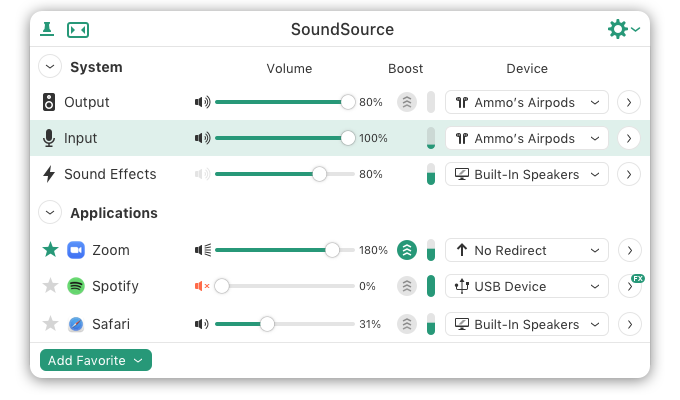

Control the settings for your Mac's Output, Input, and Sound Effects audio devices right from your menu bar.
Change the volume of any app relative to others, and send individual apps to different audio outputs.

Make any audio sound great, with powerful built-in effects, as well as advanced Audio Unit support.
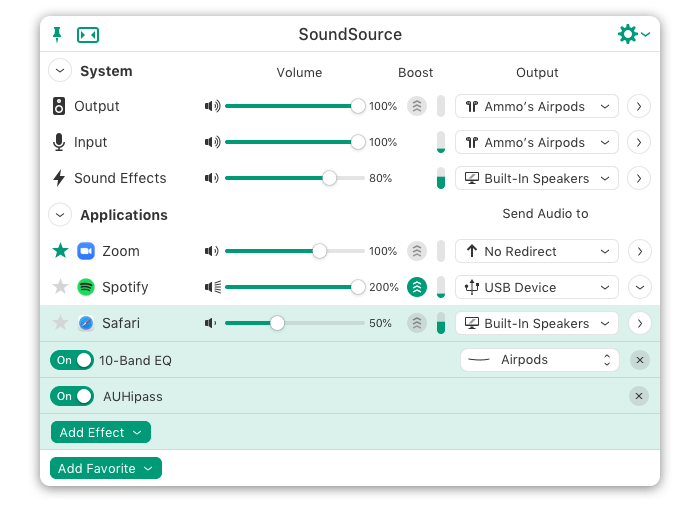

Pin the main window for floating access, toggle to Compact view, or access SoundSource's preferences.

Instantly adjust settings for the Mac's Output, Input, and Sound Effects devices.

Access volume sliders for every device and app, along with fast muting controls.

Increase volume for richer sound without distortion.

Send app audio to distinct outputs. Play music through your best speakers, and everything else to a secondary device.

Now every app has a volume slider, mute button, and much more.

Enhance the quality of audio heard from any app or system-wide device.


Adjust volume levels for each of your applications, all in one place. Make one app louder or softer than others, or even mute it entirely.

Control exactly where audio plays. Route music from one app to your best speakers, while everything else is heard via your Mac's built-in output.

Use the built-in 10-band equalizer and support for Audio Units to sweeten the sound of individual apps.

Quickly adjust volume and input levels, balance, and even sample rate for your system's Output, Input, and Sound Effects devices.

Apply effects to sweeten the sound of all audio on your system, with the built-in 10-band equalizer and support for advanced Audio Unit plugins.

HDMI devices, DisplayPort audio outputs, and more fail to support the volume keys found on Mac keyboards. SoundSource makes those keys work with any outputs you have.

SoundSource lives in your menu bar, for one-click access to all your audio controls. You can also bring it up with a configurable global keyboard shortcut.

Making frequent adjustments? Pin SoundSource's main window, and it will float on your screen for instant access.

On MacOS 12 (Monterey) and up, integrate SoundSource with workflows you run in the Shortcuts app.

The new Headphone EQ effect provides the very best sound from thousands of different models of headphones.

The new Magic Boost 2 does even more to provide rich, full sound from even the tiniest speakers.

Add optional meters for your output device, input device, and/or active applications, so you can see and control audio even more easily.

Note: While using the software in trial mode, limitations are applied. Purchase to unlock the full version.
| For MacOS 14.5 to MacOS 15: | SoundSource 5.7.2 | October 10, 2024 |
 Release Notes Release Notes
|
| For MacOS 11 to 14.4.1: | SoundSource 5.6.4 | September 16, 2024 |
Release Notes
|
| Older version of MacOS? | Learn more about Legacy versions of SoundSource. | ||
 “[T]heir description is spot-on: “Sound control so good, it ought to be built in”. All with a thoughtful, intuitive interface…SoundSource is on my short list of Mac utilities that I don’t know what I’d do without.”
“Once again, Rogue Amoeba show why they are legends in the realm of Mac Audio utility software.”
“Instabuy. This can take the place of my heavyweight Logic-as-a-effects-rack workflow for video conferencing.”
 “What's great about SoundSource is that it draws on Rogue Amoeba's experience…to create something…handy for anyone who has ever been frustrated by the way the Mac handles audio…tweaking audio routing to fit your individual needs has never been easier.”
“SoundSource…solved two big annoyances:
1. It lets me use the keyboard volume keys for my Zoom H6 audio interface.
2. It lets me turn the volume down for the Zoom meeting app independently.”
“Thank you so much for this! I've been waiting for someone to let me add Audio Unit plugins directly from the menubar…You rock!”
Timothy J.
 “The Mac audio control app Apple should have made…a must-have utility for any Mac user who wants more control over audio input and output”
“Tired: Video Calls hurting your ears because the connection is crappy and clicks a bunch.
Wired: Using @RogueAmoeba’s SoundSource to do global equalizing / limiting to remove the clicks.
”
“I've been hugely thankful…for @RogueAmoeba's tools.
SoundSource in particular makes controlling audio inputs/outputs across apps manageable”
“What a system-wide audio application SHOULD be capable of doing. Individual volume levels. Assign any audio input to any output. EQ the &*$% out of it, change sample rate, and more!”
“I’ve been working from home for the firs time in my life for the last six weeks. Once again, @RogueAmoeba elevates my game with SoundSource. Immediately useful.”
“[I]f I need an audio utility app, I always go to Rogue Amoeba first…The company’s newest is called SoundSource, but check out the other apps while you’re there.”
“[I]t's an invaluable tool for macOS audio control.”
“Holy sound control Batman!”
“PRO TIP: @RogueAmoeba’s SoundSource is a macOS utility well worth spending a few dollars on.”


This download serves as both the free trial and the full version of the software. Unlock the full version by entering a license key purchased from our store.


