
 Airfoil
 Audio Hijack
 Farrago
 Fission
 Loopback
 Piezo
Piezo
 SoundSource
Copyright © Rogue Amoeba Software, Inc. All rights reserved.


If a device you transmit audio to with Airfoil isn't appearing in Airfoil's main window as expected, this page may help.
It's possible Airfoil has been instructed to hide the device from its main list, via the Advanced Speaker Options window. Click the Speakers menu in Airfoil, then select Advanced Speaker Options. This window will show a listing of all output devices that Airfoil has detected. If the Hide Speaker checkbox is turned on next to a device, that device will not appear in Airfoil's main window. Turning this checkbox off will restore the device to Airfoil's main list.
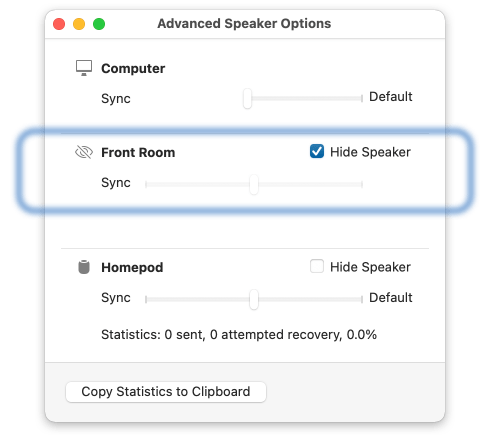
If your device isn't showing in Airfoil's Advanced Speaker Options window, read on.
The next thing to test is whether Apple's “Music” app running on your same Mac can see and stream to the device in question. Open Music, and look in the AirPlay menu to see what devices it can detect.
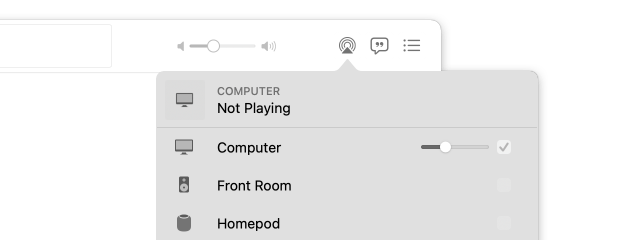
If the device doesn't appear in Music's list of outputs, there may be an issue with a system-level firewall, or a router-based security setting that prevents devices from detecting each other on your network. Apple offers additional troubleshooting steps on their support site, which may get the device working with Music. Once Music can see the device, Airfoil will as well.
If the device does appear in Music's list of outputs, and Music can transmit successfully to the device, check the device list in Airfoil’s main window again. If Airfoil still doesn’t show the device, double-check your firewall settings for Airfoil. Beyond that, contact us directly, and we can investigate further.
If a Bluetooth device is missing, you should confirm that your Mac can see it in System Settings under the “Output” tab. If it's not appearing there, there is likely some sort of connection issue. You’ll need to get the device connected to your Mac first. Once the device is visible in the list of output devices in System Settings, Airfoil should see it as well.
If the device appears in the Sound options of System Settings, but Airfoil still doesn’t see it, please contact us directly so we can investigate further.

If you need personal assistance or want to provide feedback, our friendly support team is available via email. Click below to get in touch:
Contact UsWe're amazingly responsive! We strive to reply in under 24 hours.